How I Use the Whiteout Survival Banner Calculator to Plan My Daily Banner Goals
I have been playing Whiteout Survival long enough to know that banners are one of those quiet resources that can make or break your daily progress. At first, I ignored them. Then I realized how many alliance tokens I was leaving on the table because I was not building banners efficiently. That is when I started using the Whiteout Survival Banner Calculator, and honestly, it changed how I plan my resource production every single day.
Why do banners matter so much? Every banner you build helps you earn alliance tokens, which you can spend in the alliance shop. More banners per day means more tokens, and more tokens means better items, speedups, and upgrades. It sounds simple, but figuring out how many farms you need for each resource type can get messy without a proper tool.
The calculator solves exactly that problem. It shows how many additional meat, wood, coal, and iron farms you need to hit a specific number of daily banners. You just plug in your current production rates per hour and the tool does the rest.
How I Use the Calculator
Step One – Inserting Resources
The first thing I do is open the calculator and enter my current resource rates per hour for meat, wood, coal, and iron. These are the four main production resources in Whiteout Survival, and the calculator uses them to estimate how many farms I currently have running.
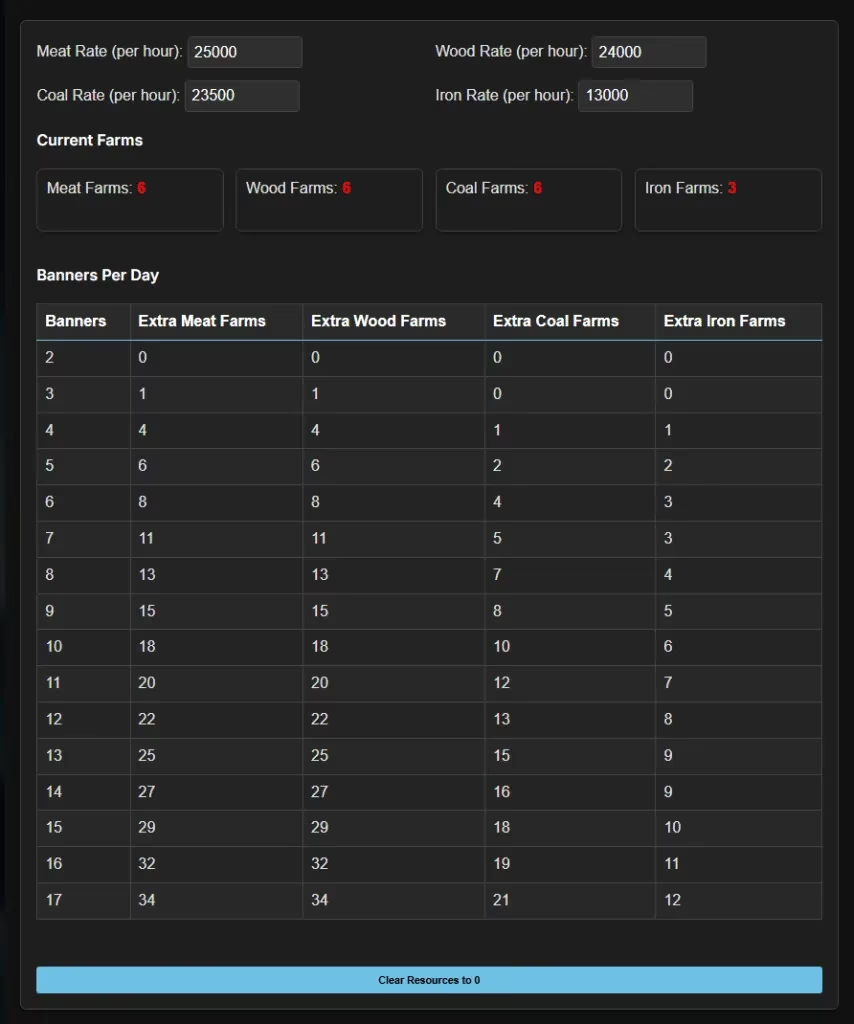
I usually check my in-game production stats first, write down the numbers, and then input them into the top fields. The calculator immediately tells me how many meat farms, wood farms, coal farms, and iron farms those rates represent. It is a quick way to see if my production is balanced or if one resource is lagging behind.
Step Two – Analysis
After entering my production rates, the real value starts to show up. The analysis table breaks down how many farms of each resource type I need to reach a certain number of banners per day. This is exactly what I was missing before. Instead of guessing how many coal farms to add, I can look at the table and see the target clearly.
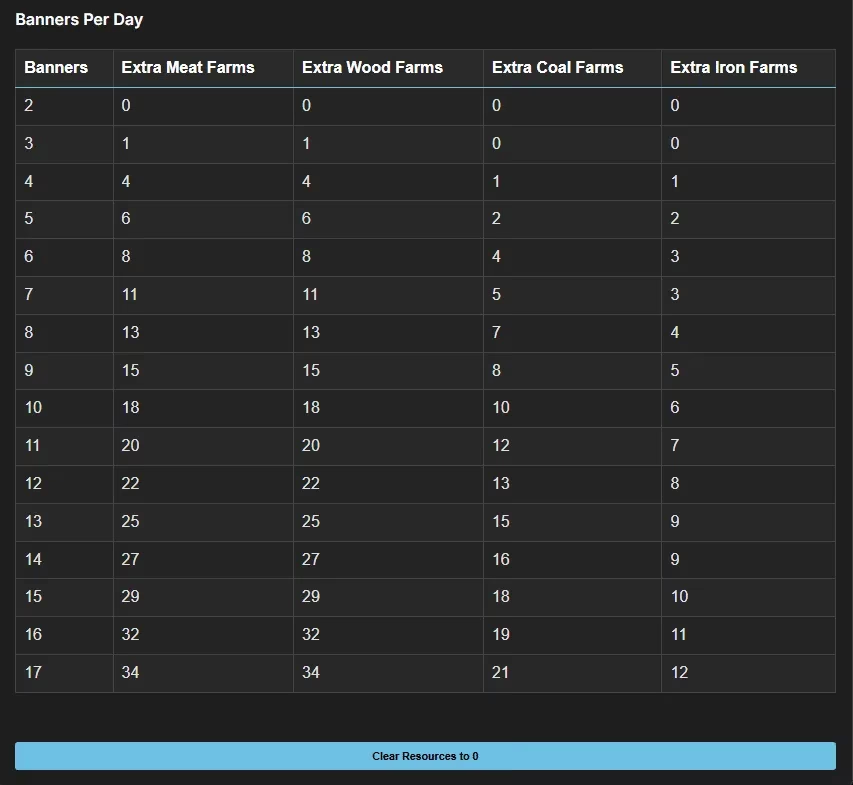
The table helps me plan upgrades in the right order. For example, if I am close to four banners per day but need two more iron farms and one more meat farm, I know exactly where to focus my construction speedups. No more wasting time on unnecessary farms.
Step Three – Clearing Resources
Sometimes I want to test a completely different setup, like after a server event or after upgrading several production buildings. The calculator has a simple “Clear Resources to 0” button that resets all the input fields instantly. That way, I can start fresh without manually deleting numbers one by one.
This sounds like a tiny feature, but it saves a surprising amount of time when you are experimenting with different farm counts throughout the day.
A Realistic Example from My Current Setup
Let me paint a picture of how I use this in practice. Right now in 2026, my chief is around furnace level 26, and I try to maintain a solid balance between troop training and resource production. My hourly rates are roughly:
| Resource | Rate per Hour | Current Farms |
|---|---|---|
| Meat | 18,500 | 5 |
| Wood | 16,200 | 4 |
| Coal | 12,400 | 3 |
| Iron | 9,800 | 2 |
When I enter those numbers into the calculator, I can see that I am producing enough for about four banners per day. But my alliance shop has a few items I really want this week, so I want to push to six banners per day. The calculator tells me I need to add one more wood farm, two more coal farms, and three more iron farms. That is a big but actionable list.
I could not have figured that out as quickly on my own. The table gives me a target, and I can decide whether to spend speedups on those farms now or wait for the next building event.
What I Like About the Calculator
There are a few things that stand out to me as a normal player:
-
It reduces guesswork. I no longer build farms randomly and hope for the best.
-
It helps me prioritize upgrades. I can see which resource is the real bottleneck.
-
It is simple. The interface is not overloaded with confusing options.
-
It supports daily planning. I check it once in the morning, update my rates, and write down my farm goals.
-
It works well with alliance events. When my alliance needs more tokens, I know exactly what to build.
One extra feature worth mentioning is the save and load option. If you are a Theria Plus member, you can save your calculator settings across devices. I do not always use that, but it is handy when I switch between phone and PC. For me, the core calculator is already enough.
A Few Tips from My Experience
If you are going to use the banner calculator, keep these in mind:
-
Update your production rates after every major upgrade. A single farm level-up can change the hourly numbers noticeably.
-
Use alliance research and buffs to boost resource production. The calculator works better when your input numbers are accurate.
-
Plan your banner goals around alliance shop refreshes. If you need a specific item, calculate backward from the token cost.
-
Do not neglect iron. Many players overbuild wood and meat but fall short on iron, and the calculator will expose that quickly.
-
Recheck your numbers during events. Some events boost gathering or production, which can temporarily change how many banners you can afford.
Final Thoughts
The Whiteout Survival Banner Calculator is one of those tools I wish I had found earlier. It turned banner planning from a vague daily chore into a simple numbers game. I enter my resource rates, check the farm requirements, reset when needed, and go build. My alliance tokens have been much steadier since I started using it.
If you are still guessing how many farms to add for your next banner goal, try this approach. You might be surprised how many extra tokens you have been missing. And thanks to the original version of this tool from WOS Nerds, the community has a reliable way to plan banner production without the headache.